What you’ll need:
An active Kommo subscription plan or 14-day trial.
Keep in mind:
All AI features in Kommo use shared AI credits.
AI credits renew monthly on the same day as your subscription renewal date.
Unused AI credits do not carry over to the next billing period.
The total number of available AI credits may vary depending on your subscription plan, active seats, and AI credit packages.
Only admins can review AI credits.
This guide explains how AI limits work in Kommo, how AI credits are used across AI features, and how admins can review available AI usage in the account.
How AI limits work
AI limits define how many AI credits can be used across AI features in the account during each billing period. Each subscription plan includes a monthly amount of AI credits for the account.
Instead of having separate limits for each AI tool, all AI features use the same shared AI credits. As AI features are used, credits are deducted from the available balance.
The amount of available AI credits depends on your subscription plan, the number of active seats in the account, and any active AI credit package.
AI features that use AI credits
AI credits are used across different AI features in Kommo, including:
AI rewriter
AI summarize
AI reply suggestions
AI task suggestions
AI agent
Сopilot
Analyst mode for Copilot (available only on the Pro plan)
Important: Available AI features may vary depending on your subscription plan.
To learn more about the AI features included in each plan, check our article.
Learn more about each AI feature in our article.
Included AI credit limits by plan
Each Kommo subscription plan includes a monthly AI credit limit.
Subscription plan | Included AI credits per seat/month |
|---|---|
Trial | 1,800 |
Base | 750 |
Advanced | 1,250 |
Pro | 2,250 |
Enterprise | 2,250 |
AI credit limits scale based on the number of active seats in the account. Adding seats increases the total amount of AI credits available for the account.
AI credits are calculated using the following logic:
Plan AI credits per seat X number of active seats
For example:
Your Pro plan includes 2,250 AI credits per seat and your account has 3 active seats, so your account will have 6,750 AI credits available in total.
Note: Kommo-related questions in AI Copilot use separate monthly limits that are not affected by the number of active seats in the account.
These limits are:
Trial and Base plans — approx. 100 questions
Advanced — approx. 150 questions
Pro and Enterprise plans — approx. 200 questions
AI credit limits reset monthly on the same day as your Kommo subscription renewal date, not on the first day of the month.
Unused AI credits expire at the end of the billing period and do not carry over to the next month.
For example:
Your Pro subscription renews on July 15 and includes 2,250 AI credits per seat.
What happens:
Your AI credit limits reset every month on the 15th.
If you use only 1,800 credits before the next renewal date, the remaining 450 credits expire.
On the next renewal date, your available AI credits reset to 2,250.
Review AI credits
Admins can review overall AI credit usage in Billing and individual spending events in the Activity log.
Check your AI credit usage
To review AI credits:
Go to Settings → Billing and open the Usage tab.
.png)
Scroll down to the AI credits section and click Manage credits.
.png)
A modal window with two main sections will open:
Credit usage
Monthly balance
A) Credit usage
The Credit usage section shows the percentage of AI credits used during the current billing period.
A progress bar helps visualize how many AI credits have already been consumed and updates as credits are used.
The section also displays the Next reset date — the day when AI credits renew based on the account billing cycle.
.png)
B) Monthly balance
This section displays the total number of AI credits available in the account during the current billing period.
This includes:
Monthly balance — Total AI credits available in the account
Included credits (per seat) — AI credits included in the subscription plan for each seat
Number of seats — Number of seats in the account
Credit add-on — AI credits from purchased AI credit packages
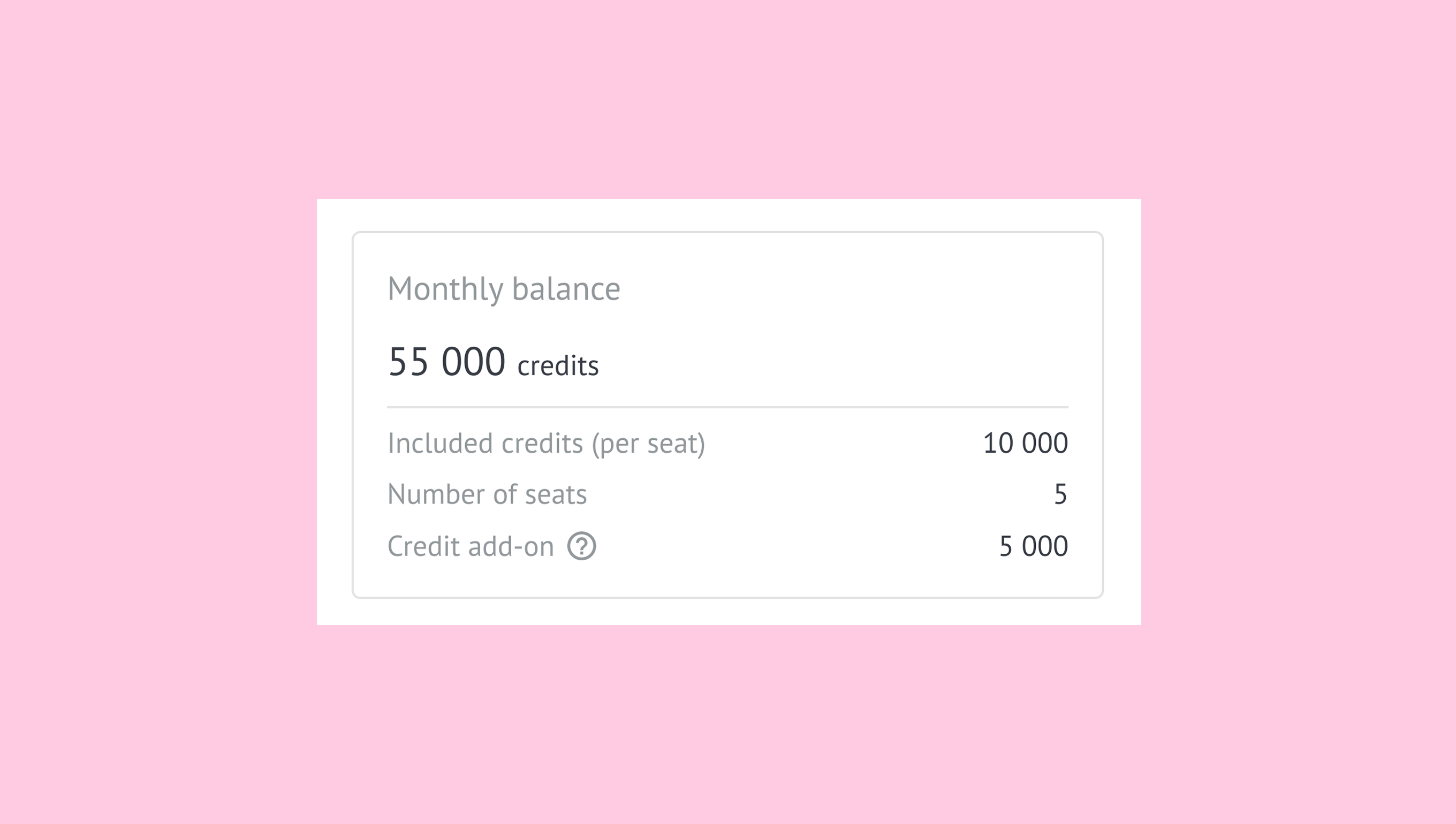
If additional AI credit packages are active in the account, hovering over the (?) icon displays the package expiration date.
Track AI credit spending
Admins can review spending events in Insights → Activity log, including:
AI agent responses
Replies and icebreakers generated in AI agent Preview
AI agent creation
AI agent responses may use credits even when they aren’t sent.
To check the credits used for a message, go to Pipelines, open the lead card, and hover over the credit indicator in the Timeline.
Note: Non-admin users must contact an account admin to review AI credit usage.
Increase available AI credits
If your account needs additional AI usage before the next renewal period, you can increase available AI credits by:
If you experience issues with AI features, AI credits, or AI limits in your account, contact us for assistance.